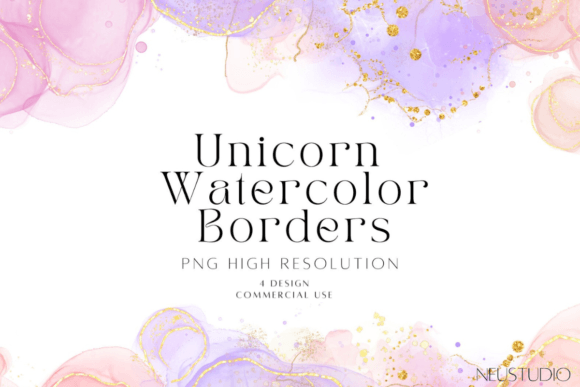
Unicorn Watercolor Borders PNG: Whimsy, Quality, and Seamless Design Magic
There’s something instantly uplifting about a unicorn—especially when it’s rendered in soft, dreamy watercolor with just the right shimmer of glitter. That’s exactly what makes Unicorn Watercolor Borders PNG files such a beloved staple among designers, educators, crafters, and DIY enthusiasts. Whether you're designing a birthday invitation for a six-year-old’s enchanted forest party or crafting printable back-to-school labels that spark joy—not stress—these borders deliver charm without compromise.
Why These Aren’t Just “Another Set of Clipart”
Not all watercolor borders are created equal. What sets this collection apart—and why so many creators return to it—is how thoughtfully each element balances artistry and utility. These aren’t digitally generated filters slapped over generic shapes. Each Unicorn Watercolor Borders PNG is hand-painted using real watercolor pigments, then enhanced with delicate, light-reactive glitter textures that translate beautifully on screen *and* in print.
The result? A tactile, organic feel—even as a digital file. You’ll notice subtle granulation in the pigment, gentle bleeds at the edges, and intentional variations in opacity and sparkle. That authenticity matters. It keeps your designs from looking mass-produced or overly polished—perfect for audiences who value warmth, personality, and handmade charm.
Two Sizes, One Smart Workflow: 8000 px @ 300 DPI & 4000 px @ 400 dpi
Practicality meets precision in the technical specs—and yes, they’re worth paying attention to. This pack includes Unicorn Watercolor Glitter Borders in PNG Format, delivered in two carefully calibrated resolutions:
- 8000 px width at 300 DPI — ideal for high-end printing: large-format posters, premium invitations, scrapbook pages, or boutique packaging where crisp detail and rich color depth are non-negotiable.
- 4000 px width at 400 DPI — optimized for digital-first use (social media banners, Canva templates, classroom slides) *and* still sharp enough for smaller printed items like stickers, flashcards, or mini journals.
Both sizes retain full transparency—no white backgrounds, no awkward cropping needed. Just drag, drop, and scale. Because every border is saved as a true PNG with alpha channel support, it layers cleanly over photos, gradients, or textured backgrounds without clipping or haloing.
What “Transparent PNG” Really Means for Your Projects
Transparency isn’t just a buzzword—it’s workflow fuel. Imagine adding a glittery unicorn border around a photo of your child blowing out birthday candles. With a transparent PNG, the border frames the image *without obscuring it*. No extra masking. No time wasted erasing backgrounds in Photoshop.
This simplicity shines in fast-paced environments: teachers preparing last-minute classroom decorations, small business owners updating Etsy listings before a holiday rush, or parents assembling digital scrapbooks after bedtime. The Unicorn Watercolor Borders PNG set removes friction—not creativity.
Where These Borders Shine (Literally and Figuratively)
You’ll find these borders working quietly—but powerfully—in all kinds of real-world contexts:
- Birthday Invitations & Party Printables: Frame cupcake menus, “RSVP by…” cards, or photo collages with a border that whispers “magic,” not “clipart.”
- Kids’ Cards & Classroom Resources: Add visual delight to behavior charts, reading logs, or vocabulary flashcards—engagement starts with aesthetics.
- Scrapbooking & Memory Keeping: Layer over polaroids or journal entries to evoke nostalgia while feeling fresh and current.
- Digital Planners & Habit Trackers: Soft watercolor + subtle glitter adds gentle emphasis—no harsh lines or visual fatigue.
- Back-to-School Projects: From welcome banners to editable name tags, these borders help kids (and their grown-ups) feel excited—not overwhelmed—about the new year.
Even beyond traditional crafts, designers use them as subtle UI accents in kid-focused apps, newsletter headers for parenting blogs, or background elements in YouTube thumbnails targeting young audiences. Their versatility lies in being *distinctive but not distracting*.
Glitter Done Right: Shimmer Without the Sparkle Overload
Let’s talk glitter—because not all glitter borders are created equal. Some go full disco ball: blinding, pixelated, and impossible to tone down. These Unicorn Watercolor Glitter Borders in PNG Format take a more refined approach.
The glitter is applied sparingly and organically—like fine mica dust catching morning light. It appears only where pigment pools or edges soften, never as uniform texture across the entire shape. That means:
- No clashing with busy backgrounds.
- No loss of legibility when overlaid on text-heavy layouts.
- No need to desaturate or blur in editing software—what you see is what you get.
This subtlety makes them adaptable across age groups and styles. A teen designing a vision board? They’ll love the ethereal glow. A kindergarten teacher making laminated center signs? The softness ensures clarity at a glance.
How to Use Them Without Design Experience
You don’t need Adobe Illustrator or years of training to make these borders work for you. Here’s how beginners and pros alike get great results fast:
- In Canva: Upload the PNG, resize to fit your canvas, and use “Position” > “Behind” to layer under text or images—or “In Front” to create a decorative frame.
- In Google Slides or PowerPoint: Insert > Image > Upload from device. Right-click > “Wrap Text” > “Square” for easy repositioning.
- In Procreate or Affinity Designer: Import as a layer, then adjust blend mode (try “Overlay” or “Soft Light”) to let underlying colors interact with the watercolor texture.
- For Print Projects: Open in Photoshop or Affinity Photo, verify resolution matches your output specs (300 DPI for letterpress, 400 DPI for fine-art prints), and export as PDF/X-4 for professional printers.
Pro tip: Try flipping or rotating borders for unexpected asymmetry—especially effective in scrapbook layouts or modern nursery wall art.
What Users Say—and Why It Matters
Real feedback tells a clear story. Teachers report that students respond more enthusiastically to worksheets bordered with unicorns than plain ones—even when content is identical. Small business owners note higher click-through rates on social posts featuring these borders versus stock graphics. Parents mention how much calmer the “craft prep” process feels when assets are intuitive, scalable, and joyful to use.
That emotional resonance—paired with technical reliability—is why Unicorn Watercolor Borders PNG continues to be a top-searched, top-downloaded design resource. It answers an unspoken need: to bring wonder into everyday creation—without slowing you down.
Final Thought: Magic Is in the Details (and the DPI)
At its core, this collection proves that thoughtful design isn’t about complexity—it’s about intention. Every brushstroke, every shimmer, every pixel was chosen to serve both beauty and function. Whether you’re printing 50 birthday invites at home or building a branded digital product for thousands, these borders adapt, elevate, and enchant—quietly, consistently, and completely.
So if you’ve ever paused mid-design, wondering how to add just the right hint of whimsy without sacrificing professionalism—or simply wanted to make “kids’ projects” feel special again—you already know what to reach for.